
KeenAi One · Demo Home
Walk through a home you can talk to.
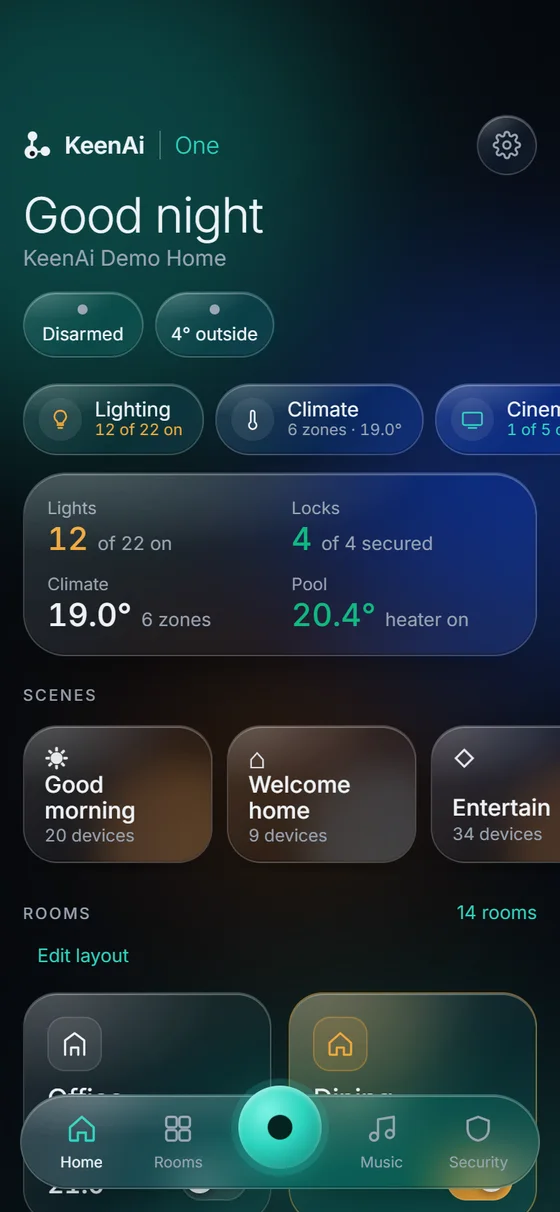
KeenAi One is our home automation platform: one app for the whole home, run by a hub inside it, with an assistant you can ask. The house is an illustration. Every phone screen is the real KeenAi One app on our Demo Home, answering requests asked of it by voice or by text.
Six stops, about a minute and a half.
Garage · Ask KeenAi by voice
Open the garage by voice
“Open the garage door and turn on the entry lights.”
KeenAi finds the right devices in your home and shows you its plan. The garage door is a security device, so nothing moves until you confirm.
Media Room · Ask KeenAi by text, then Cinema
Movie night in the Media Room
“Close the Media Room blackout shades and turn on the star ceiling.”
Two devices, one request, and nothing moves until you tap Confirm. Then open Cinema, tap the Media Room projector and the film starts, with the remote, volume and inputs on the same screen.
Great Room · Ask KeenAi by voice
Shades and heat in one sentence
“Close the Great Room shades and set the Great Room to 21 degrees.”
Shades and heating answer to the same sentence. The Demo Home has six climate zones, and each one holds its own temperature.
Kitchen & mechanical · Automatic
A leak that shuts off the water by itself
When the Kitchen Leak Detector gets wet, the hub closes the main water on its own and tells your phone. The rule runs inside the house, so it does not need the internet, and the app shows Closed only once the valve confirms it. More on water leak detection and shut-off.
Pool · Ask KeenAi by text
Check the pool from the couch
“Is the pool heater running?”
KeenAi answers from the pool controller, and the Pool screen shows water temperature, heater and filter next to everything else in the house.
Good night · Ask KeenAi by voice
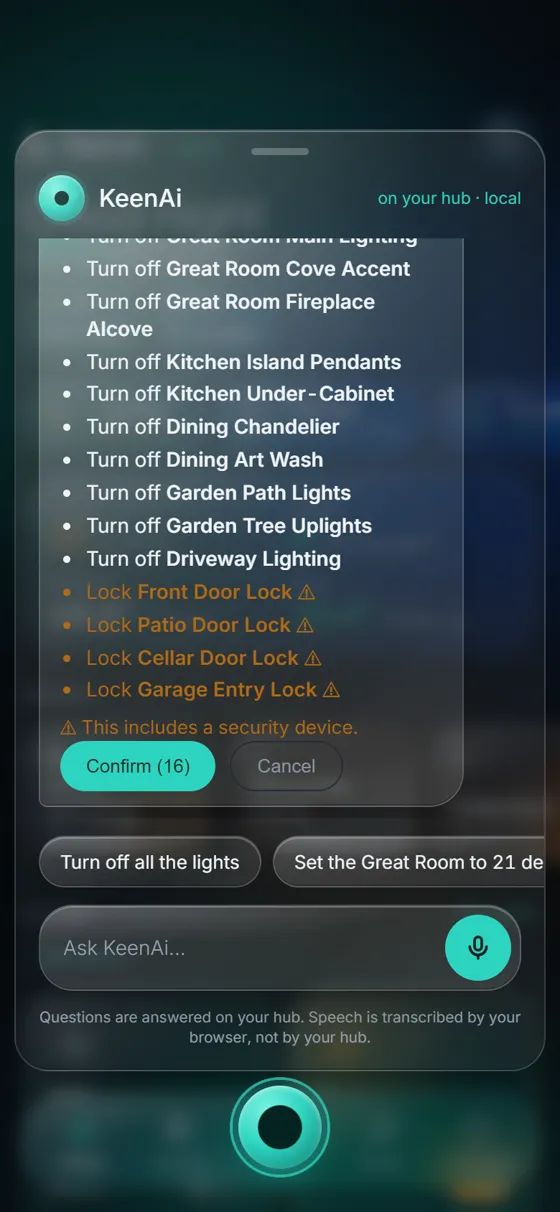
Lock up with one sentence
“Turn off all the lights and lock all the doors.”
Twelve lights and four locks in one plan. Locks are marked as security devices, so you know exactly what you are approving before you confirm.
Explore
Explore the Demo Home
Tap a room in the house to see it again. Every KeenAi home is designed around the people who live in it, and the best way to see what yours could do is a walk-through.
House: illustration. App screens: KeenAi One on our Demo Home hub, captured October 2026. Spoken requests were fed to the app’s speech input for filming. Speech is turned into text by your phone or browser; the plan is worked out on the hub.
What KeenAi One is
One platform, three parts
KeenAi One is a home and building automation platform, designed, installed and supported by KeenAi in Saskatoon. A hub inside your building runs your devices, your automations and the AI assistant. You control all of it from one app on your phone, a tablet or a wall panel.
The app
KeenAi One
Every system in your home on one screen, room by room or the whole house at once. The same app on your phone, a tablet or the wall panel, at home or away.
In your building
The KeenAi hub
A small computer that runs your devices, automations and assistant locally. When the internet drops, your lights, heat, locks and water protection keep working.
From us
KeenAi monitoring
Remote access, alerts, health checks, safe updates and backups. The hub dials out to us and nothing dials in. Your home never depends on it to run.
Everything that runs your home runs in your home.
The app
One app instead of seven
Lighting, shades, climate, security and locks, water, energy, cinema, music and pool, in one place instead of a separate app and login for each brand. Your devices can be any mix of Zigbee, Z-Wave, Matter, Thread, Wi-Fi and wired systems.
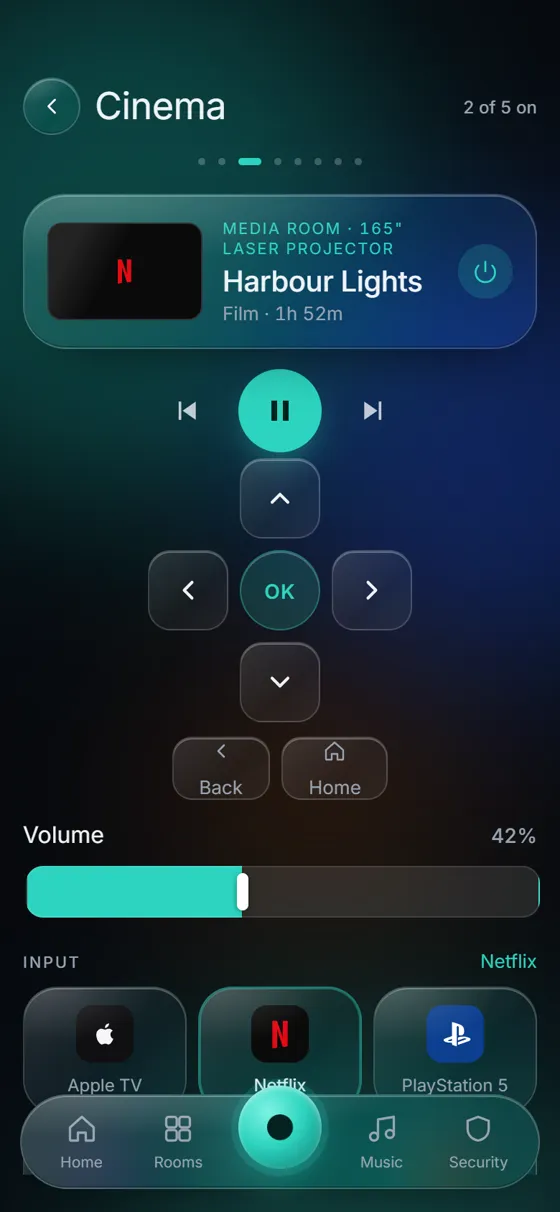
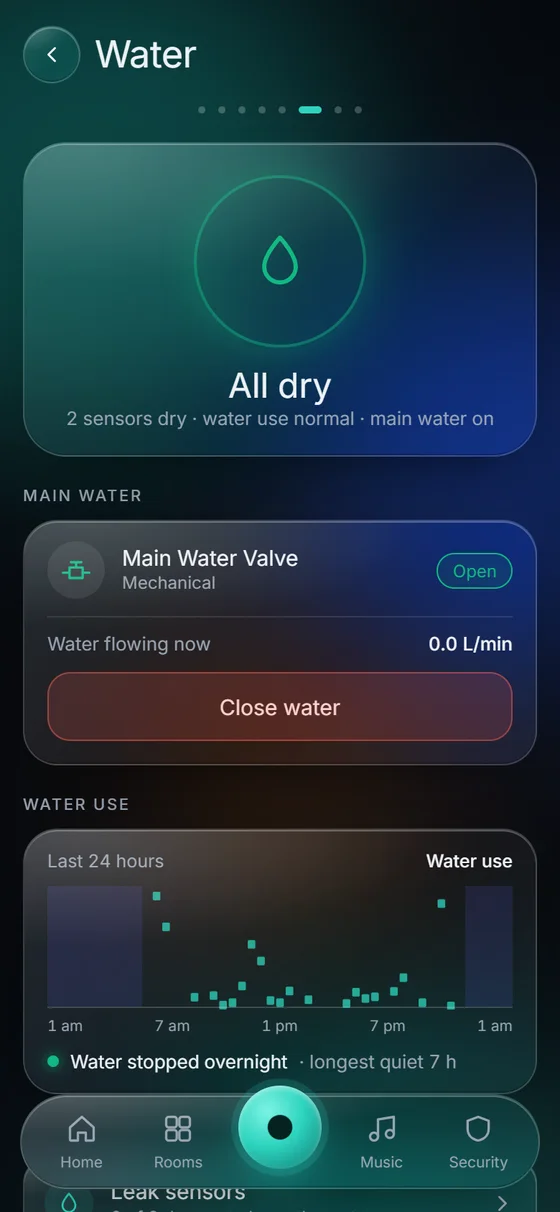
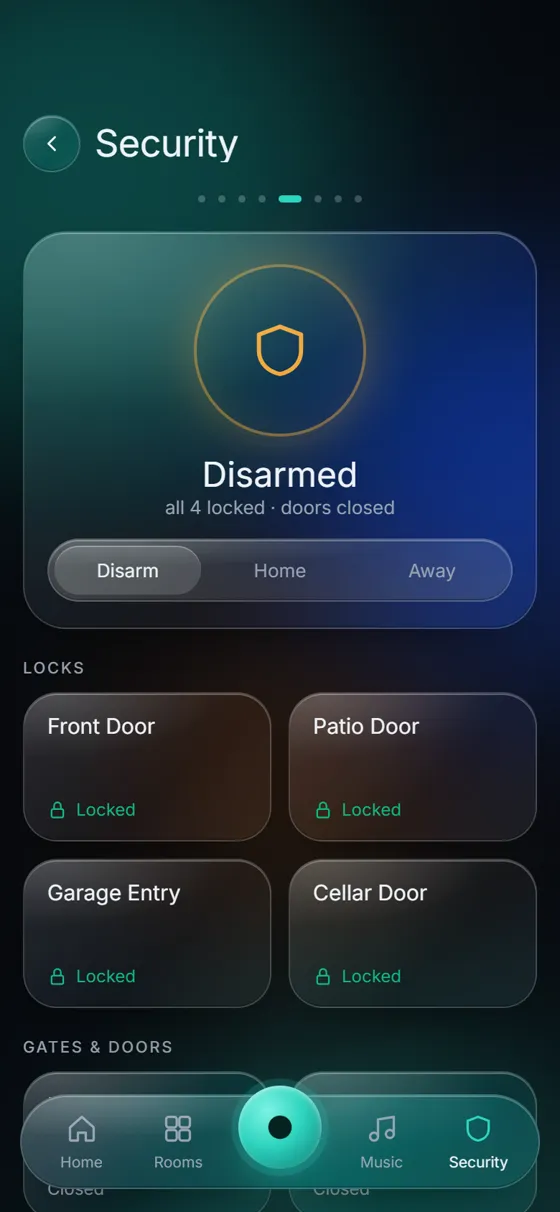
Real screenshots of KeenAi One on our Demo Home hub, October 2026.
- Honest about what it can’t see. A sensor that goes quiet shows “no signal”, never “dry”.
- Alerts reach your phone, leaks included, even with the app closed.
- Act from anywhere. Close the main water valve from out of town if an alarm comes in. More on water leak protection.
The assistant
An assistant that lives in your building
Ask KeenAi about your home, or ask it to do something. It answers from your home’s own live data, with a model that runs on the hub.
Ask
Type or speak in the app: “Close the Great Room shades and set the Great Room to 21 degrees.”
See the plan
KeenAi matches your words to your devices and lists exactly what will change. Locks, doors and garage doors are marked as security devices.
Confirm
Nothing moves until you tap Confirm. The AI proposes; a deterministic rule engine acts. It can never unlock a door on its own.
About voice. Today your phone or browser turns your words into text, and the hub works out the plan. Voice processed entirely on the hub is in development; existing hubs will get it as an update.
Built to last
Built for year three, not the showroom
Most automation companies resell somebody else’s system. KeenAi One is our own platform, built on open standards, so we can change it. The differences show up later: when a product line is retired, when the internet drops, when something needs fixing.
Works offline
Automations, scenes, schedules, the wall panel and the assistant all run on the hub. The internet drops in Saskatchewan; your home shouldn’t notice.
No open ports
The hub dials out to us and nothing dials in. No port is forwarded to your home, which removes the most common way home systems are attacked.
We see it first
The hub reports its own health: a module that stopped, a drive filling up, a device gone quiet. Most faults we can look at without a visit.
Updates that undo themselves
Each update is health-checked as it applies. If it doesn’t come back clean, the hub rolls back to the last good state on its own.
Backed up
Checksummed backups of the hub’s configuration, and a full wipe-and-restore we have rehearsed.
No lock-in
Ordinary Zigbee, Z-Wave, Matter and IP devices, mixed by brand. If we ever part ways, they are still ordinary devices.
Where it runs
From one home to a whole development
The same platform, the same app and the same support, scaled to the building.
Homes
New builds and renovations in Saskatoon, Warman, Martensville and the surrounding area, with the wiring and network built to carry it.
Rentals and short-term units
Leak detection with automatic shut-off, heating you can set between stays, and remote access from wherever you are.
Modular, RTM and developments
Fitted at the factory instead of chased through a finished wall. One dashboard covers every hub, and updates roll out in stages.
Commercial and multi-unit
Offices, clinics and multi-unit buildings, where KeenAi One sits above the building systems you already have.
Three tiers, one system
Standard, Enhanced and Premium share the same app. They differ by the hub hardware, how many systems are switched on and how capable the assistant is, so a home can move up a tier without starting over. We quote per project after the assessment.
How it works
How a KeenAi One project runs
Assessment
We walk the building, see what is there and ask what actually annoys you. No charge, no obligation.
Design
A written design: what goes where, which tier fits, what the network needs and what it will cost, before anything is ordered.
Installation
Cabling and hardware, then the hub, then the devices. Everything labelled and documented.
Handover and support
We set it up with you, then keep watching it: health monitoring, alerts and updates that roll back if they misbehave.
Common questions
What is KeenAi One?
KeenAi One is KeenAi’s home and building automation platform. A hub in your building runs your lighting, shades, climate, security, water protection, entertainment and pool, with an AI assistant that runs on the hub. You control it from one app on your phone, a tablet or a wall panel.
Is KeenAi One an alternative to Control4 or RTI?
Yes. It does the same job, one app and one system for the whole home, without tying you to one manufacturer’s catalogue or dealer network. The intelligence runs on a hub in your building rather than a vendor cloud, and we own the platform, so we can change it.
What happens when the internet goes out?
The home keeps working. Automations, schedules, scenes, the wall panel and the assistant all run on the hub. You lose remote access and push alerts until the connection returns, and both come back by themselves.
Can I talk to KeenAi One?
Yes, by voice or by typing in the app. The assistant matches your request to the devices in your home and shows you a plan, and nothing moves until you confirm. Today your phone or browser turns your speech into text; voice processed entirely on the hub is in development.
Can the AI unlock my door or change my heating on its own?
No, and that is deliberate. The assistant can read, explain and propose, but a deterministic rule engine does the acting. Anything safety-related, such as locks, alarms and heating limits, needs a rule you set or your explicit approval.
Does my data leave the house?
The assistant runs on your hub, so the reasoning about your home happens in your home. What leaves is what the service needs: system health so we can support you, and the alerts you asked to receive on your phone.
Do I need a monthly subscription?
The system runs without one. It is on your hub and it is yours. Ongoing monitoring, alerts and support are a service we offer, and we tell you exactly what is included and what it costs before you commit.
Can you take over a system somebody else installed?
Often, yes. Devices that use open standards, such as Zigbee, Z-Wave, Matter or ordinary IP, can usually be brought onto KeenAi One and keep working. Proprietary equipment is case by case, and we will tell you honestly if the answer is no.
Is this only for large homes?
No. The same platform runs a rental suite, a ready-to-move house, an office and an estate; the tier changes, the system doesn’t. Some of the most useful installs are small: leak protection with automatic shut-off, heating control, and knowing what is happening in a building you are not in.
What is the KeenAi Demo Home?
Our own KeenAi One hub connected to a simulated modern house with a garage, media room, great room, kitchen, pool and six climate zones, so we can show every feature without using a customer’s home. The 3D tour at the top of this page uses real screens from it.
See it running before you decide
Book a free assessment. We walk your building, show you KeenAi One working and tell you plainly which tier fits, including if the answer is that you don’t need us.
Serving Saskatoon, Warman, Martensville, Regina and the surrounding region.