
Home Automation in Saskatoon: One System, One App
Lights, heat, locks, cameras, music and water working as one house instead of twelve apps that don’t talk to each other. We design and install it on a hub in your home, so it keeps running through an internet outage — and you never pay a subscription to use it.
- No subscription to run your home
- 1,500+ device integrations
- Locally owned, Saskatoon
What is home automation?
Home automation connects the systems in your house — lighting, heating, locks, cameras, shades, audio and water — so they work together and can be run from one app, a wall panel or your voice. A good system handles the routine on its own: the lights at sunset, the heat when you leave, the water when a pipe bursts.
The difference between a pile of smart gadgets and a home automation system is where the decisions happen. Ours run on a hub inside your house, not on a company’s server, so the things that matter keep working when the internet doesn’t.
- One app for the whole houseKeenAi One: every room, scene and system on your phone and on the wall.
- Runs in your homeSchedules, scenes and safety rules live on a local hub and run through an outage.
- Keeps what you ownMost existing smart devices join the system instead of going in a drawer.
- Yours outrightYou own the hardware, the passwords and the documentation. No monthly fee to use it.
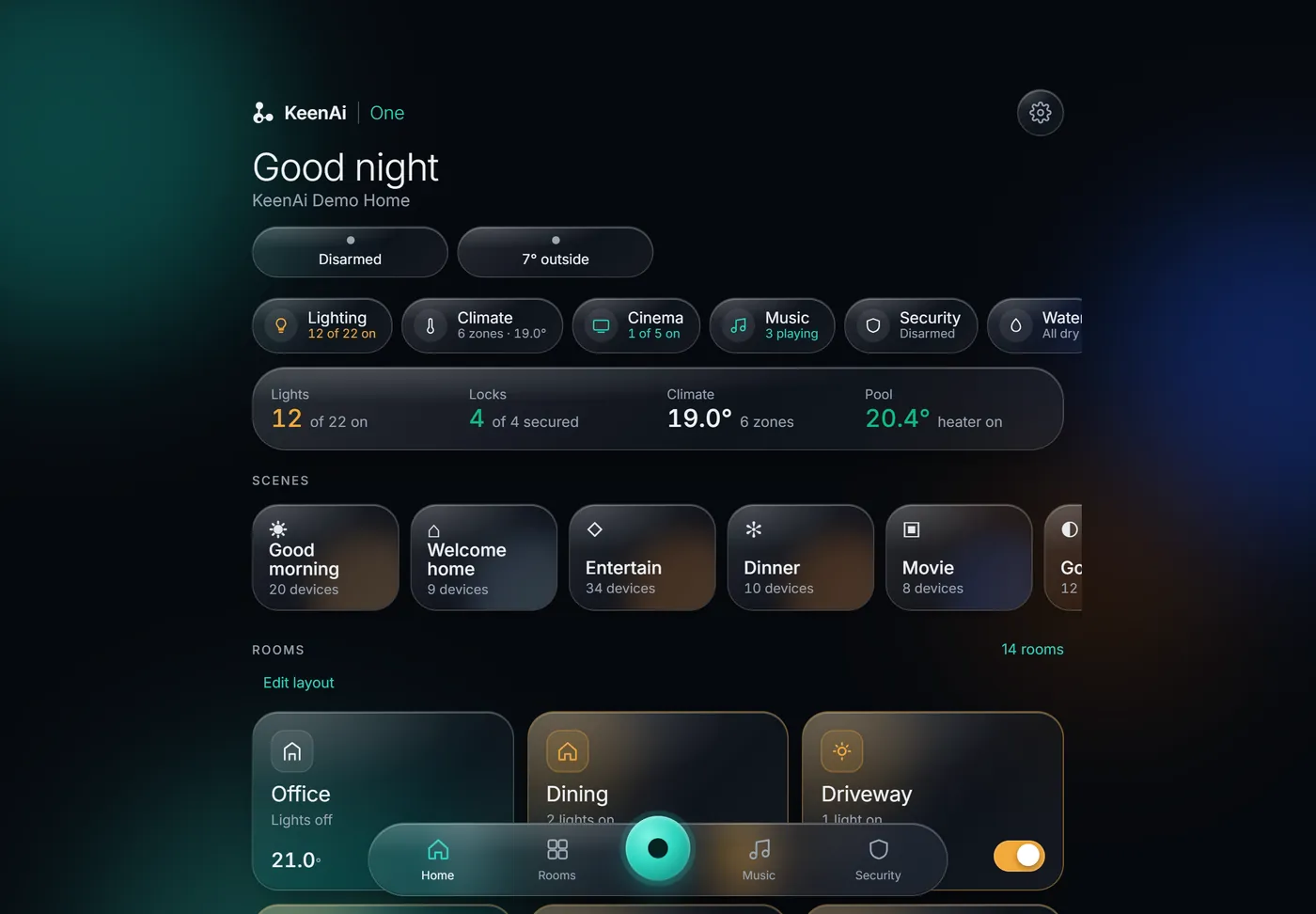
The whole house on one screen
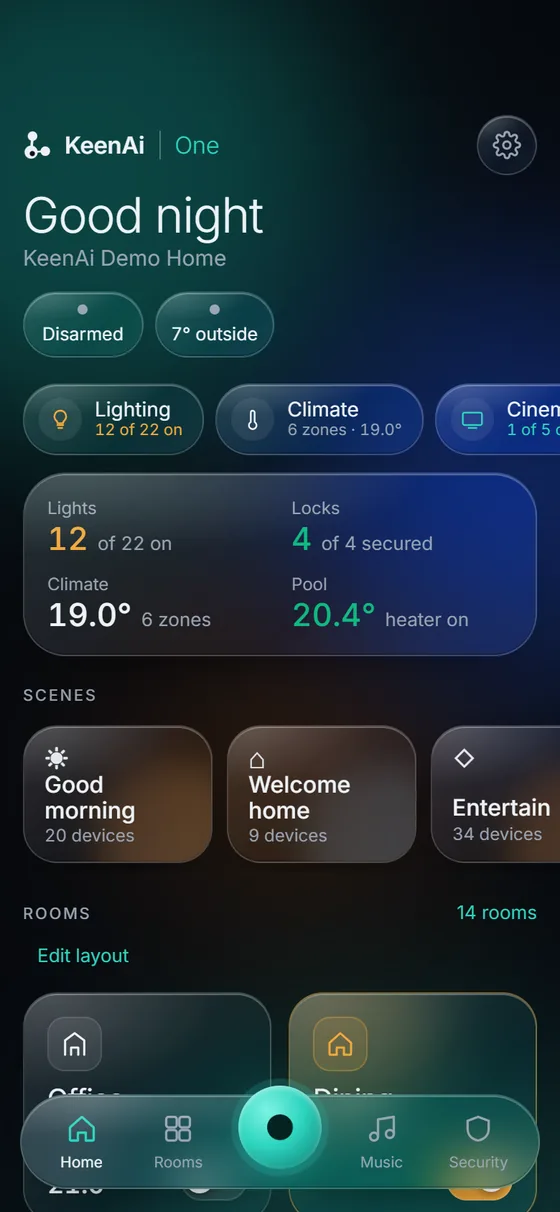
- The state of the house at a glance. How many lights are on, whether every door is locked, the temperature in each zone and whether the water is dry.
- Scenes, one tap each. Good morning, Welcome home, Dinner, Movie — each one sets lights, shades, heat and music together.
- Every room, its own screen. Fourteen rooms in our demo home, each with its lights, climate and media in one place.
- Ask in plain words. “Turn off the lights downstairs.” KeenAi shows you its plan, then does it when you confirm.

Lighting
Every light in the house by room, with All off, Comfortable and Full in one tap.
Climate
Every zone’s set point and real temperature, changed from anywhere.
Security
Locks, gates, the garage and cameras together, with Home and Away modes.
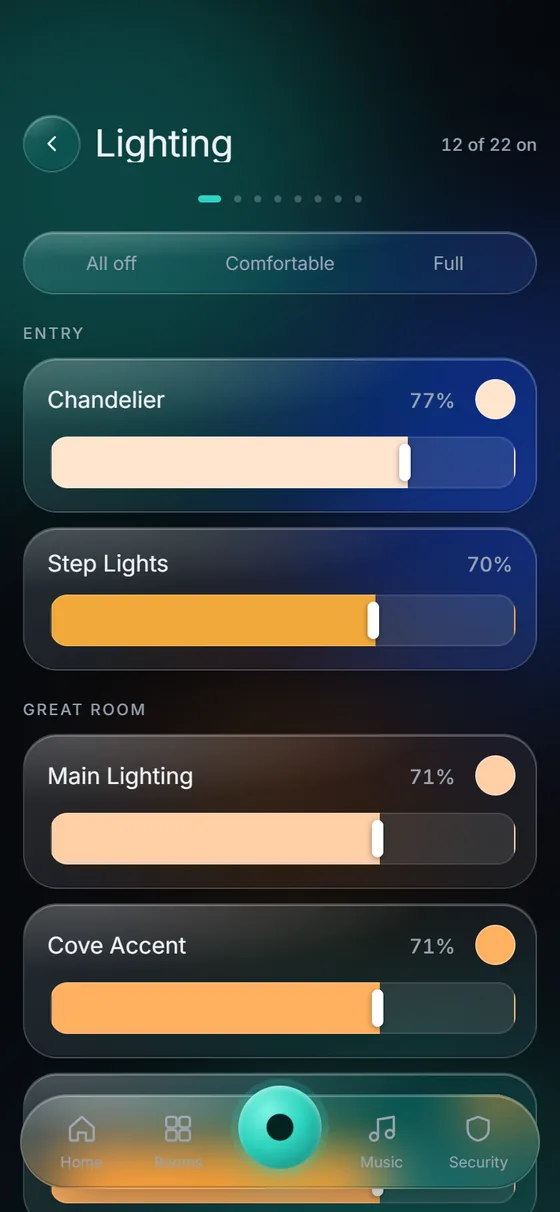
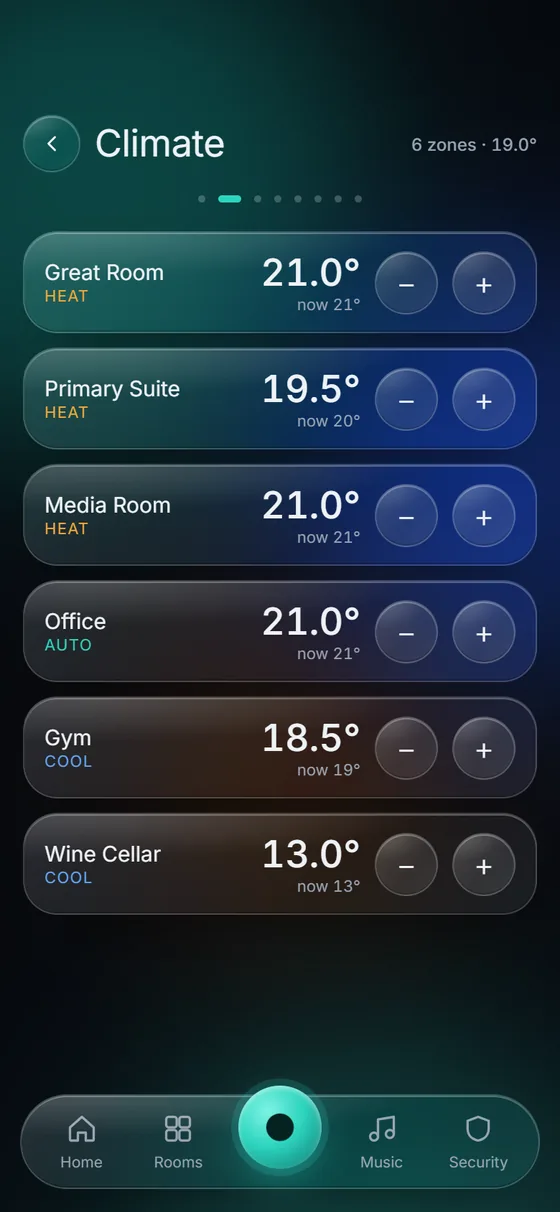
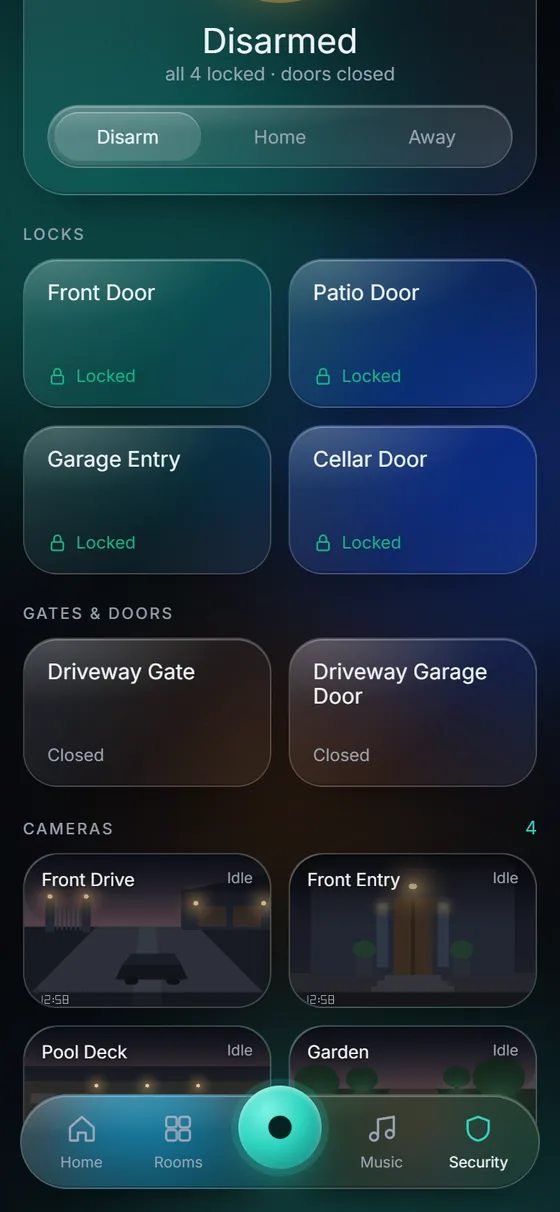
Real screens from KeenAi One, running our demo home.
The house handles the routine, so nobody has to
Every system is set up around the people in it. This is the kind of day we design for — and every step still has a switch, a keypad or a tap in the app.
Good morning
The kitchen lights come up gently, the bedroom shades open and the house is already warm.
Last one out
One tap on Away: lights off, doors locked, heat eased back and water flow watched.
It tells you
A delivery at the door, a door left unlocked, a room too cold — the alert reaches your phone, even with the app closed.
Welcome home
The driveway and entry lights are on as you pull in, the living spaces warm, music in the kitchen.
Good night
Lights off downstairs, doors locked, a soft path light to the stairs, the heat stepped down.
“Smart” shouldn’t feel like a second job
A doorbell in one app, lights in another, the thermostat in a third, cameras in a fourth. Every app is a different company with its own servers and its own idea of your privacy — and when one of them changes its terms, a piece of your house stops working.
Nothing talks to anything
The lock doesn’t know you’ve left. The thermostat doesn’t know the house is empty. Each device is clever on its own and useless together.
It breaks when the internet does
Cloud-dependent gear stops responding in an outage — and on an acreage or in a winter storm, that’s exactly when you need it.
Only one person can drive it
Whoever set it up holds the accounts. Everyone else reaches for a switch that no longer does what it used to.
One panel by the door instead of a hallway of controls
A wall panel running KeenAi One shows the house as you walk in or head out: what’s on, what’s open, how warm it is, and every scene a tap away.
- The same app as your phone, laid out for the wall.
- For everyone in the house, including the people who will never install an app.
- Switches stay switches. The panel adds to the house; it doesn’t replace anything people already know.
One system, built from the rooms up
Start with the room or the problem that bugs you most. Everything else joins the same system later, with no rip-and-replace.
Lighting & shades
Smart switches, scenes, sunset timing and motorized shades.
Climate & heating
Thermostats, baseboard and in-floor control, room by room.
Security & access
Cameras recording at home, smart locks, gates and the garage.
Water leak protection
Leak sensors, flow watch and a main shut-off that closes from anywhere.
Home theatre & audio
Screens, speakers and music in every room, with the lights.
Outdoor living
Irrigation, landscape lighting, the pool, patio heat and snowmelt.
Energy
See what the house draws and switch the big loads.
Air, light & wellness
Air-quality sensing, light that follows the day, independent living.
WiFi & networking
The wired, segmented network everything else depends on.
App pile, cloud hub or a system that runs at home?
There are three common ways to end up with a “smart home.” They behave very differently on a bad day.
| Separate brand apps | Voice assistant hub | KeenAi One | |
|---|---|---|---|
| Where decisions happen | Each maker’s cloud | Mostly the assistant’s cloud | A hub in your home |
| Internet outage | Most devices stop responding | Much of it stops | Schedules, scenes and safety rules keep running |
| Devices working together | Rarely | Basic routines | Designed scenes across every system |
| Everyone in the house | Whoever holds the accounts | Anyone who can speak to it | App, wall panel, keypads and switches |
| Who makes it work | You | You | Us, then handed over to you |
KeenAi One works alongside Alexa and Google Assistant if you like using them — they become one more way in, not the place your house lives.
Saskatchewan is the design brief, not an afterthought
−40 is a system requirement
A system here has to assume the power flickers, the internet drops and the garage is far colder than the living room. Heat, lighting and water shut-off run on hardware inside your house.
Long winters change the job
Around the winter solstice Saskatoon gets about seven and a half hours of daylight. Lighting that follows sunrise and sunset changes how a house feels for months.
Acreages and cabins
Detached shops, long driveways, rural internet and homes that sit empty for a week. Away modes, temperature floors and water shut-off matter most when nobody is there to notice.
When you don’t need us
We would rather tell you the truth and lose the job than sell you something you didn’t need.
- One or two smart things? Buy a smart plug and a decent thermostat and set them up yourself. That’s a good afternoon, not a project.
- Renting and can’t change wiring? Plug-in and battery devices get you most of the way. We’ll point you at what works and leave it there.
- Happy in one ecosystem? Don’t let anyone talk you out of it. Our value is integration; with nothing to integrate, there’s no value.
- Is the real problem WiFi? Fix that first. Many “my smart home is unreliable” complaints are a network problem in disguise.
Where we earn our fee is the harder case: several systems, several brands, people in the house with different patience for technology, and a result that has to be reliable enough that nobody thinks about it.
From twelve apps to one system
Free assessment
We walk the house, look at what you own and ask what actually bugs you.
Design & quote
A plain-English scope, phased if you like, with a fixed quote on the spot.
Install & integrate
Clean installs, hardwired work to code by licensed electrical partners, every scene tested.
Handover
The app on every phone, everyone in the house shown how, and the documentation in your name.
Home automation: frequently asked questions
What does a home automation system actually do?
It connects the lighting, heating, locks, cameras, shades, audio and water protection in your house so they work together, and gives you one app and wall panel to run them. Day to day, it runs scenes and schedules on its own — lights at sunset, heat eased back when you leave, the water shut off if a leak sensor gets wet.
Do I have to replace the smart devices I already own?
Usually not. The platform we build on works with more than 1,500 device integrations, so most of what you own can join the system. Some cloud-only devices genuinely can’t be integrated, and we’ll tell you which ones at the assessment rather than after the invoice.
What happens when the internet goes out?
Your local automations keep running — lights, schedules, heat and leak response — because they run on hardware in your home. What pauses is control from outside the house and notifications to your phone; both resume by themselves when the connection returns.
Is this the same as Alexa or Google Home?
No. Those are cloud assistants: the request travels to a data centre and back. KeenAi One keeps the decision-making in your house, and it can work alongside Alexa or Google if you like using them. The difference is where your home’s intelligence lives, and who can switch it off.
Can I talk to it?
Yes. Ask in plain words in the app — “close the Great Room shades and set it to 21 degrees” — and KeenAi shows you its plan, then does it when you confirm. Locks, alarms and the water valve stay under fixed rules and your own taps; the assistant never decides those on its own.
Do I need a subscription?
No subscription is required to run your home or see your own cameras. You own the hardware. Monitored alarm response, for police and fire dispatch, is a separate, optional service, and we’ll tell you honestly when it’s worth it.
Can everyone in the house use it, not just the person who set it up?
Yes, and that’s a design requirement. Wall switches and keypads keep working the way people expect, a wall panel shows the house to anyone walking by, and every adult can have the app. Nobody is forced through a phone to turn on a light.
Can I start small and add to it later?
Yes. Most people start with lighting, climate or water protection. Cameras, audio, outdoor and energy join the same hub and the same app later, without replacing what’s already in.
Can renters or condo owners do this?
Yes. There are plenty of options that don’t involve changing wiring, and we design around what you’re allowed to modify. If the honest answer is “buy three devices and skip the install,” we’ll say that too.
What if KeenAI weren’t around in five years?
Your system is built on open standards and you own the hardware, so it keeps running, and any competent professional could take it over. That’s deliberate — a system only one company can service holds you hostage, and we don’t build those.
Is this an alarm system?
No. A home automation system is not a certified, monitored alarm. It doesn’t qualify for insurance discounts and can’t guarantee emergency dispatch. Monitoring is a separate product — see security & access control for how the two fit together.
How much does home automation cost in Saskatoon?
It depends on the house and how much of it you want connected: one floor of lighting and a whole-home system are very different jobs. We give you a fixed quote at a free on-site assessment, before any work begins.
Updated October 2026.
See the system for yourself
Make your home the smartest thing you never think about
Free on-site assessment in Saskatoon, Warman and Martensville. A fixed quote on the spot, and an honest answer about what you actually need.
Elsewhere in Saskatchewan? Get a free quote without a visit; larger projects travel.